
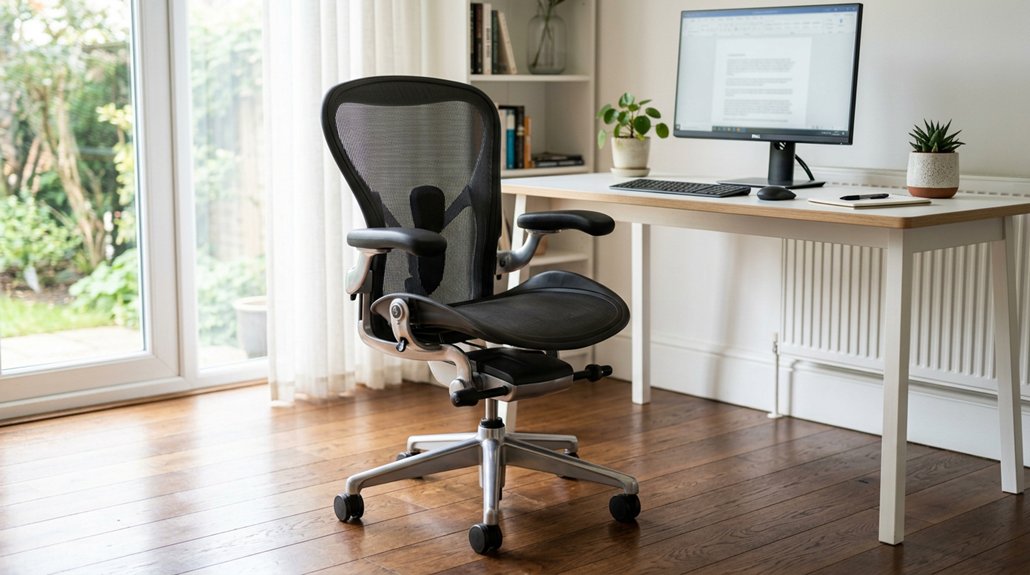
To evaluate office chair ergonomics, check if it’s fully adjustable for your height, including seat height, depth, and armrest positions. Confirm lumbar support fits your lower back comfortably without causing pressure, and that the seat allows a two-finger gap behind your knees. Test the recline range and tension to match your movements. Verify the stability and smooth mobility of the base with appropriate casters. Keep exploring for more tips to find the perfect fit for your workspace.
What Features Make an Office Chair Supportive and Ergonomic?
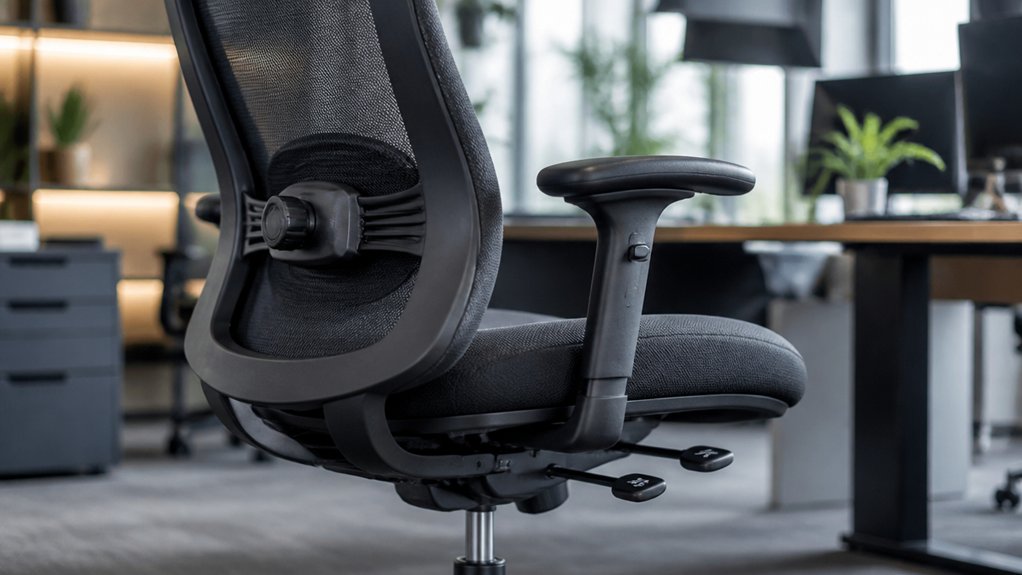
To guarantee your office chair provides proper support and ergonomic benefits, focus on key features that promote comfort and spinal health. An ergonomic chair should have adjustable lumbar support that aligns with your lower back, ideally moving vertically by at least two inches to match your L3–L5 vertebrae.
The seat height should be adjustable between 15 and 22 inches so your feet rest flat and your knees form a 90°–100° angle for proper circulation. The seat pan needs to allow a two-finger gap behind your knees and be level or slightly tilted downward, encouraging thigh circulation and reducing pelvic tilt.
Adjustable armrests are essential, letting you support relaxed shoulders and keep your elbows around 90°, minimizing shoulder and wrist strain. Additionally, features like lumbar support mechanisms with multiple adjustment options help maintain natural spine alignment and reduce lower back strain.
How to Ensure the Chair Is Fully Adjustable for Your Body
Ensuring your office chair is fully adjustable starts with checking that it offers a range of personalized settings to fit your body. Start by verifying the chair height adjustment—aim for a pneumatic seat height of about 15–22 inches—so your feet rest flat on the floor or a footrest. The seat depth should be adjustable enough to leave a 2-finger gap behind your knees, reducing pressure and promoting circulation. Look for vertical lumbar support with at least 2 inches of travel to align properly with your lower back curve. Make sure the backrest reclines between 90° and 120° with tension control and lock options, supporting active sitting. Finally, assess armrest adjustability in height, depth, and pivot to keep your elbows comfortable at 90°, reducing shoulder strain. Additionally, consider the adjustability mechanisms of the stool or chair, such as pneumatic lifts or push-button controls, which facilitate smooth and secure adjustments tailored to your posture.
Does the Lumbar Support Fit and Feel Comfortable?
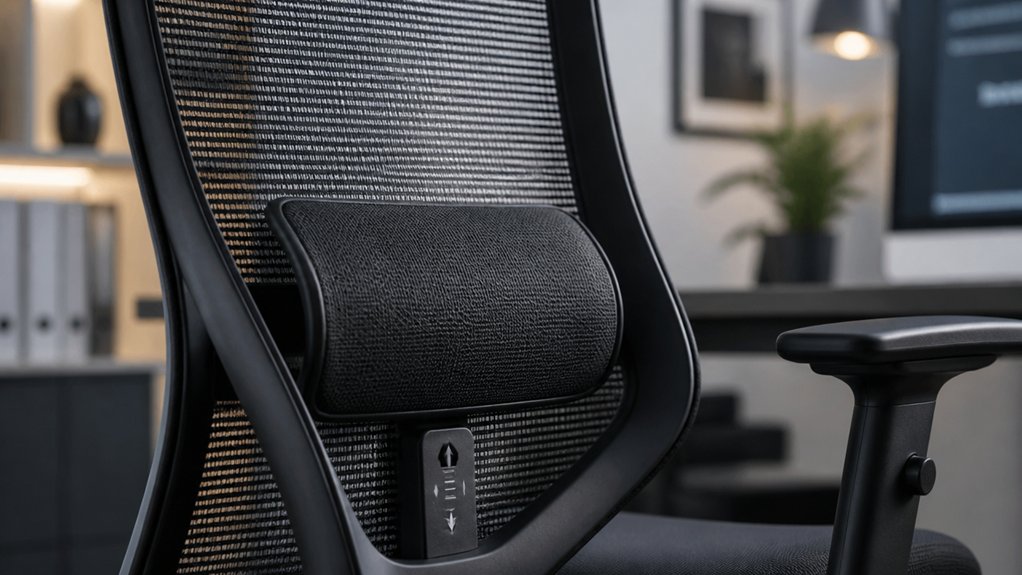
Once you’ve confirmed your chair offers a fully adjustable lumbar support, it’s time to evaluate how well it fits and feels. The lumbar support should align with your lower back, roughly at or just below your belt line, targeting the L3-L5 vertebrae. It needs at least 2 inches of vertical adjustment for a precise fit.
When seated, there should be no more than a two-finger gap between the support and your lower back, ensuring firm but comfortable contact. Avoid supports that push excessively forward or feel too stiff, as they can cause discomfort and poor posture. A proper lumbar support provides gentle pressure that maintains your spine’s natural curve, helping reduce back pain and musculoskeletal disorders during extended sitting.
Check how well it adapts across different recline angles for peak support and consider support technology to ensure the cushion maintains its ergonomic shape during movement.
Can You Adjust the Seat Depth and Height to Fit You?
Make sure you can easily adjust the seat height so your feet rest flat on the floor with your knees bent at a comfortable angle. Check if the seat depth allows for a 2-finger gap between your knees and the seat edge, preventing pressure and supporting proper circulation. Ensuring these adjustments are smooth and precise helps maintain good posture and overall comfort. Additionally, verifying that the chair offers adjustable height levels with a secure locking mechanism can help you achieve consistent support during long periods of sitting.
Proper Seat Depth Fit
Adjusting your chair’s seat depth and height is essential for comfort and proper ergonomics, as these settings directly influence your posture and circulation. To prevent pressure on the back of your knees and promote good circulation, aim for a 2-4 inch gap between the seat edge and the back of your knees. Proper seat depth prevents pelvic tilt and supports proper lumbar curve. Make certain the seat height allows feet to rest flat on the floor or footrest, with knees bent at 90°–100°. Use the following table to fine-tune your adjustments:
| Adjustment | What to Check | Why It Matters |
|---|---|---|
| Seat Depth | 2-4 inch gap | Maintains circulation |
| Seat Height | Feet flat | Supports lower body |
| Seat Position | Neutral posture | Reduces strain |
Additionally, ensuring your ergonomic armrest pads fit properly can help maintain proper arm and shoulder alignment, contributing further to overall ergonomic support.
Adjusting for Leg Comfort
Properly setting your seat height and depth guarantees your legs stay comfortable and well-supported during long hours at your desk. Adjust the chair height so your feet rest flat on the floor or a footrest, with knees slightly below your hips, creating a healthy torso-thigh angle of at least 90°. This promotes good blood circulation and reduces fatigue.
Ensure your chair’s height and tilt features are adjustable and ergonomic, allowing you to customize support based on your specific needs. Check the seat depth: it should leave a 1-2 inch gap between the seat edge and the back of your knees, preventing pressure points and promoting better circulation. If your chair lacks sufficient depth adjustment, use a footrest to support your feet comfortably.
Ensuring your seat height and depth are correctly adjusted helps maintain proper posture and leg comfort, reducing discomfort during extended periods of sitting.
Correct Seat Height Position
Guaranteeing your seat height and depth are set correctly is essential for ergonomic comfort and support. An adjustable seat height lets you keep your feet flat on the floor or on a footrest, promoting proper posture. The ideal range is 15 to 22 inches, suitable for most body sizes.
When adjusted, your knees should be slightly below your hips, with a torso-thigh angle of at least 90°, which helps maintain blood flow and reduces fatigue. Proper seat depth adjustment creates a 2-finger (about 2 inches) gap between the back of your knees and the seat edge, preventing pressure and improving circulation.
An adjustable seat pan also helps maintain your lumbar curve, avoiding pelvic tilt. These adjustments guarantee peak support and comfort during long hours at your desk. Additionally, incorporating a memory foam cushion with height boost features can further enhance comfort by providing targeted coccyx and lower back support ergonomic design.
Are the Armrests Adjustable and Supportive?
Check if the armrests are adjustable in height, depth, and angle to prevent nerve compression and shoulder strain.
Make sure they’re slightly wider than your shoulders to support your arms comfortably without pushing them up. Properly supported arms help keep your shoulders relaxed and reduce upper back and neck tension. Additionally, ensure that the armrests feature multi-directional adjustability to achieve the most ergonomic positioning.
Armrest Height Compatibility
Have you considered whether your office chair’s armrests are adjustable and supportive? Proper armrest height is vital for ergonomic comfort. When adjustable, armrests allow your elbows to stay close to your body with your elbows bent at about 90°, which is ideal for typing or mouse use.
Look for armrests that enable your forearms to be parallel to the floor while keeping your wrists straight, preventing strain. Comfort increases when armrests support your arms evenly, reducing shoulder tension and promoting relaxed shoulders.
Opt for models with 3D adjustability—height, depth, and pivot—to tailor fit different body sizes and desk setups. Supporting your arms at the correct height guarantees ergonomic alignment, minimizes static muscle load, and helps prevent discomfort during long working hours.
Armrest Width Support
The width of your armrests plays a crucial role in providing proper support and maintaining comfortable posture throughout your workday. To follow ergonomic principles, armrests should be wider than your shoulder width, offering full support without pushing your arms upward or causing shoulder strain.
Adjustable armrests—those with height, depth, and angle controls—help you align your elbows close to your body at about a 90° angle, reducing discomfort. Properly positioned armrests prevent shoulder hunching and wrist bending, decreasing tension and fatigue.
When armrests are too high, they elevate shoulders; too low, they lack support. Adjustable features guarantee you can keep your arms relaxed beside your torso and avoid awkward reaching, promoting better ergonomic support.
- Guarantee armrests are wider than shoulder width for full support
- Prioritize adjustable armrests with 3D adjustability options
- Proper positioning minimizes shoulder, neck, and wrist strain
- Choose armrests that allow relaxed arm placement, avoiding tension
Is the Seat Material Breathable and Cushioned for Comfort?
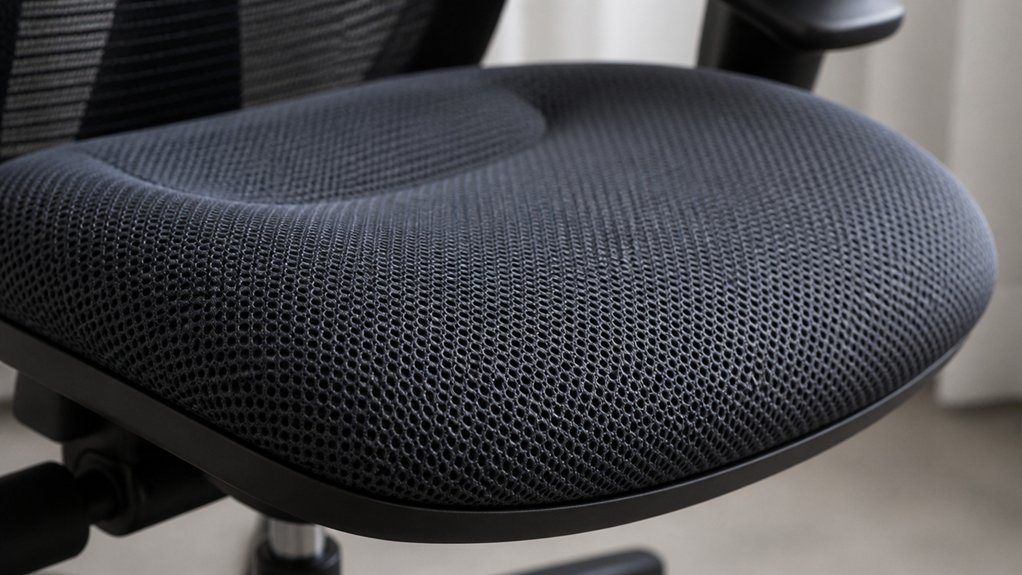
Are the seat materials breathable and cushioned enough to guarantee lasting comfort? A good chair uses breathable materials like mesh to promote airflow, preventing heat buildup and moisture, which keeps you comfortable during long hours.
The seat cushion should have proper padding to distribute your body weight evenly, avoiding pressure points that can cause discomfort. Foam density matters—you want a balance: too soft, and the pelvis tilts; too firm, and you risk pressure buildup.
Combining breathable fabric with supportive cushioning secures temperature regulation and long-lasting comfort. Materials that retain elasticity and cushion integrity over time help prevent sagging, promoting good spinal alignment.
Does the Chair Recline Easily and Support Movement?
A chair that reclines smoothly and supports movement helps you stay comfortable and maintain good posture throughout the day. Look for an ergonomic office chair with a recline range of about 90° to 120°, allowing spinal decompression and active sitting.
An adjustable tension control is essential to match your body weight, making movement effortless. Prefer chairs with independent backrest movement or synchro-tilt, which keeps lumbar support consistent as you recline. Good recline functionality redistributes pressure on spinal discs, reducing muscle fatigue and strain.
Features like recline lock allow you to secure your preferred angles for comfort during breaks.
- Smooth recline mechanism with adjustable tension control
- Synchro-tilt for synchronized upper and lower back movement
- Secure recline lock for postural variation
- Consistent lumbar support during recline
Is the Base Stable and Mobile With Suitable Casters?
Check if the chair has a five-star base for stability and balanced support.
Make sure the casters match your floor type and can handle the weight without tipping. Smooth mobility and secure rolling are essential for safe, reliable use.
Base Stability and Balance
Guaranteeing your office chair has a stable base is essential for safety and comfort, especially when you need to move or reach across your workspace. Look for a five-star design, which evenly distributes weight and minimizes tipping risks.
The casters should match your floor type; dual-wheel casters provide smooth mobility, particularly for heavier loads or extensive use. Chairs designed for users over 80kg benefit from robust dual-wheel casters to prevent failure and maintain balance. The base must allow 360° swivel without wobbling, so you can reach comfortably without strain.
- Check for a sturdy five-star design for better weight distribution
- Confirm casters match your flooring—prefer dual-wheel on hard floors or carpet
- Verify the base allows smooth, wobble-free swivel
- Opt for heavy-duty casters if you have a heavier chair or user
Suitable Wheel Compatibility
When selecting casters for your office chair, it’s essential to confirm they suit your floor type and support smooth, stable movement. The office chair bases should feature a stable five-star design to distribute weight evenly and reduce tipping risks.
Choose casters that match your floor—hard casters for carpets and soft casters for hard surfaces—to guarantee peak mobility. Dual-wheel casters offer better stability and durability, especially for chairs supporting 80kg or more, preventing failures during recline.
Worn-out or inappropriate casters can compromise posture support by causing instability and restricting movement. Make sure the casters roll easily and smoothly, promoting micro-movements that encourage active sitting and help reduce musculoskeletal strain.
Proper wheel compatibility ensures your office chair remains both stable and mobile during daily use.
Preventing Tipping Risks
A stable office chair base with the right casters plays a vital role in preventing tipping accidents. A five-star chair base helps guarantee proper weight distribution, reducing tipping hazards.
If you’re a heavy user or have an accessory setup around 80kg, dual-wheel casters are better for maintaining stability during recline, preventing falls. Choosing casters suited to your flooring type is essential, as incompatible or low-quality casters increase instability. Excessively loose or worn casters can cause sudden shifts, risking tipping.
Verifying that the chair base and caster system meet ergonomic safety standards and align with user weight and floor type guarantees stability and safety.
- Use a five-star chair base for even weight distribution
- Select dual-wheel casters for heavier setups
- Match caster type to the flooring material
- Inspect casters regularly for wear and looseness
What Additional Features Help Maintain Good Posture?
What additional features can truly help you maintain good posture throughout the workday? Features like adjustable lumbar support, which allows precise alignment with your lower back, are essential. 3D adjustable armrests support relaxed shoulders and proper elbow alignment, reducing nerve compression. Seat depth adjustability guarantees a 2–4 inch gap behind your knees, promoting circulation and comfort. A recline angle ranging from 90° to 120° encourages active sitting, decreasing spinal disc pressure. Breathable mesh backrests aid airflow, keeping you cool and reducing fatigue. To visualize:
| Feature | Function | Benefit |
|---|---|---|
| Adjustable lumbar support | Aligns with L3-L5 vertebrae | Maintains natural lumbar curve |
| 3D adjustable armrests | Support for shoulders and elbows | Prevents nerve compression |
| Seat depth adjustability | Customizes distance behind knees | Enhances circulation |
| Recline angle range | Promotes muscle relaxation | Less spinal pressure |
How to Test and Choose the Best Office Chair for You
Testing and choosing the right office chair involves systematically evaluating key features to confirm it supports your body properly.
Start by adjusting the seat height to 15–22 inches so your feet rest flat, with knees at a 90–100° angle. Check the lumbar support by confirming at least 2 inches of vertical movement aligns with your lower back (L3–L5), avoiding a gap larger than two fingers.
Test the seat pan depth—there should be a 2–4 inch gap behind your knees for proper support without restricting circulation. Ensure the armrests are 3D adjustable—height, depth, and pivot—to keep shoulders relaxed and elbows close.
Finally, perform a recline adjustment test to confirm the backrest moves smoothly between 90° and 120°, promoting spinal decompression during long periods of sitting.
Frequently Asked Questions
How Does the Chair Support Dynamic Movement and Range of Motion?
Your chair supports dynamic movement with adjustable features like seat height, lumbar support, and armrests, allowing you to move freely. It encourages a full range of motion, reducing strain and enhancing comfort throughout your workday.
Are There Recommendations for Adjusting Chair Tilt for Different Tasks?
You should adjust your chair tilt based on your activity; use a reclined position for relaxation, a slight tilt for reading, and an upright posture for typing, ensuring comfort and proper support during various tasks.
How Can I Identify Signs of Poor Ergonomic Design Over Time?
You notice signs of poor ergonomic design when you develop persistent discomfort, aches, or numbness; experience fatigue or decreased productivity; or feel constant strain in your neck, shoulders, or back while using your office chair regularly.
What Are Common Ergonomic Mistakes to Avoid When Selecting an Office Chair?
You should avoid chairs that don’t support your lower back, have armrests that restrict movement, or lack adjustable features. Guarantee the seat height, depth, and lumbar support are customizable to fit your body properly.
How Often Should Ergonomic Adjustments Be Reviewed or Changed?
You should review and adjust your ergonomic setup every few months or whenever you notice discomfort. Regularly checking guarantees your chair supports proper posture, prevents strain, and adapts to any changes in your health or work habits.




Leave a Reply