
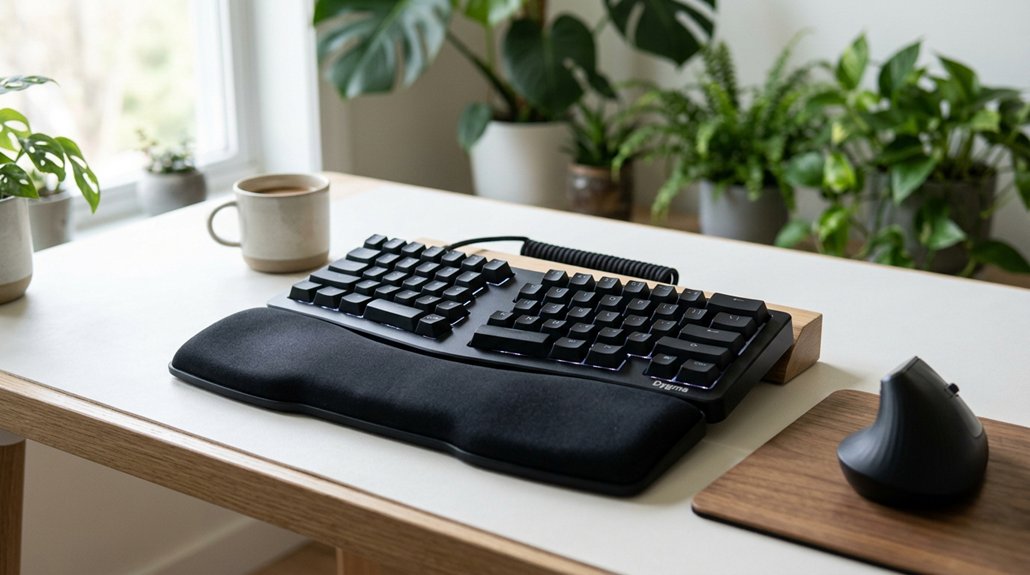
For wrist pain, an ergonomic keyboard with a split, tented design can be your best choice. These keyboards encourage a neutral wrist position, reducing strain from bending or extension. Look for features like adjustable tenting, cushioned palm rests, and a curved layout to support natural hand alignment. Combining this with proper workspace setup can prevent discomfort over time. Keep going to discover more tips for finding and setting up the perfect ergonomic solution for your needs.
What Causes Wrist Pain and How Ergonomic Keyboards Help

Wrist pain often happens because standard flat keyboards force your hands into awkward positions. When your wrists bend, extend, or deviates ulnarly, it increases pressure on the median nerve, raising your risk of carpal tunnel syndrome. Using ergonomic features like split layouts and adjustable tilt settings can significantly reduce these risks by promoting healthier wrist postures. Ergonomic keyboards help by using a split design that encourages neutral wrist alignment, reducing strain and fatigue. Features like wrist rests support your wrists in a straight, comfortable position, preventing repetitive strain injuries. These keyboards often have negative or flat slopes to keep your wrists straight during typing.
How Do Split and Tented Keyboard Designs Reduce Wrist Strain?
How exactly do split and tented keyboard designs help reduce wrist strain?
Split keyboards allow you to adjust each half independently, keeping your hands shoulder-width apart, which reduces ulnar deviation. Tenting raises the center between the halves at angles typically from 0 to 40 degrees, helping to minimize forearm pronation. This promotes a more natural handshake posture, maintaining neutral wrist angles that prevent extension and bending.
The ergonomic design of split and tented keyboards, like the Kinesis Freestyle, reduces muscle and nerve compression by aligning wrists, forearms, and elbows properly. Adjustable tenting capabilities let you customize angles, further decreasing strain during long typing sessions.
Which Keyboard Features Are Most Comfortable for Your Wrists?
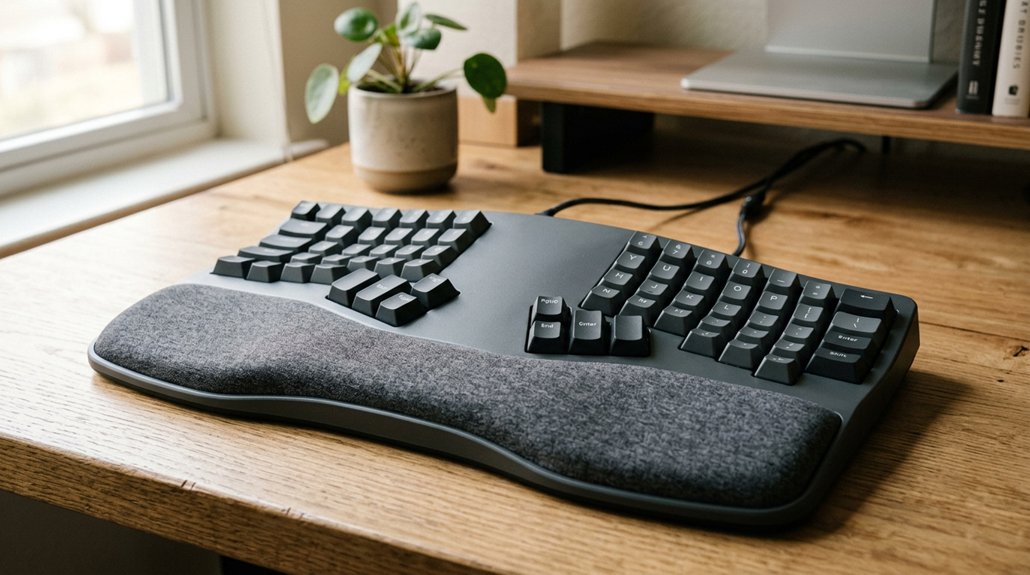
Have you ever wondered which keyboard features can make your typing experience more comfortable and reduce wrist strain? Ergonomic keyboards with specific design features promote neutral wrist alignment and ease movement. Look for split keyboards with adjustable halves and tenting (0-40°) to reduce wrist extension. Integrated or detachable palm rests support your wrists, preventing hovering and cushioning tendons. Curved rows or wave-inspired layouts, like Logitech Wave Keys, promote natural finger movement, minimizing finger joint stress. Low-profile or negative slope keyboards keep wrists in a straight, neutral angle, reducing wrist arching. Light, easy-press keys with 40-50 gf actuation forces reduce finger joint impact. Consider these features for maximum comfort: wireless connectivity, to allow freedom of movement and reduce clutter around your workspace.
| Feature | Benefit |
|---|---|
| Split keyboard with adjustable tenting | Promotes neutral wrist alignment |
| Palm rests | Prevent wrist hovering, reduce strain |
| Curved/wave layouts | Ease finger movement and joint stress |
Best Accessories to Support Wrist Health and Comfort
Using the right accessories can make a significant difference in maintaining wrist health and comfort during long typing sessions. Add palm rests to your customizable ergonomic keyboard or fully split model to cushion wrists and minimize muscle pinching.
Consider a split design in two halves to keep your wrists in a handshake position, reducing strain. Pair your keyboard with a vertical mouse to prevent forearm twisting and align your wrists naturally. Soft, memory foam wrist rests support a neutral posture and absorb pressure, especially during extended periods.
Selecting products with supportive ergonomic shapes ensures proper wrist alignment and helps prevent discomfort over time. Portable options like wireless keyboards with adjustable height and laptop stands help elevate screens, encouraging proper forearm alignment. These accessories work together to keep your wrists relaxed, prevent repetitive strain, and enhance overall comfort.
Setting Up Your Workspace for Optimal Wrist Ergonomics

Setting up your workspace with proper ergonomic principles can greatly reduce wrist strain during extended typing sessions. First, position your keyboard with a slight negative or flat slope to keep your wrists in a neutral, straight alignment. A split keyboard allows each half to be independently positioned, keeping your hands shoulder-width apart and reducing ulnar deviation. Use a cushioned palm rest to support your wrists and prevent hovering, easing tendon pressure and carpal tunnel risk. Keep your forearms parallel to the floor with elbows at about 90 degrees to maintain muscle memory and reduce forearm fatigue. For ideal setup, consider slight tenting and two panels for natural hand positioning. Utilizing wrist rest accessories can further enhance comfort and support during long typing sessions.
Frequently Asked Questions
What Keyboard Is Best for Wrist Pain?
You should choose an ergonomic keyboard with a wave-inspired design and built-in wrist rest, like the Logitech Wave Keys, or a fully split, adjustable keyboard like the Kinesis Freestyle Edge, to maintain neutral wrists and reduce strain effectively.
Are Ergonomic Keyboards Better for Your Wrists?
Yes, ergonomic keyboards are better for your wrists because they promote a neutral position, reduce pressure on nerves, and prevent strain. You might need a short adjustment period, but long-term comfort and health benefits outweigh initial learning curves.
How to Stop Wrist Pain From Keyboard?
To stop wrist pain from keyboard use, keep your wrists straight with a split keyboard, use palm rests, take regular breaks with stretches, switch to a vertical mouse, and adjust your keyboard height and tilt for neutral wrist positioning.
Do Keyboard Wrist Rests Actually Help?
Yes, wrist rests help by cushioning your wrists, promoting neutral alignment, and reducing pressure on tendons. They prevent muscle and nerve pinching, especially when used with split keyboards and ergonomic mice, easing wrist pain during long typing sessions.
In Summary
Choosing the right ergonomic keyboard can make a big difference in relieving wrist pain. Focus on features like split or tented designs, adjustable angles, and cushioned wrist rests to find what’s most comfortable for you. Remember to set up your workspace properly and consider helpful accessories. By making these adjustments, you can reduce strain and enjoy a healthier, more comfortable typing experience every day. Your wrists will thank you!



