

To support shoulder health, set your armrests 0–2 cm below relaxed elbow height, creating a 90–100° bend and keeping your shoulders relaxed. Adjust for your body’s proportions and activity—narrower for typing and wider for gaming. Guarantee armrests are fully adjustable, and periodically change their height and position throughout the day to prevent muscle tension and stiffness. Keep your posture neutral to avoid long-term shoulder problems, and discover more expert tips for peak comfort.
Why Proper Armrest Height Matters for Shoulder Health
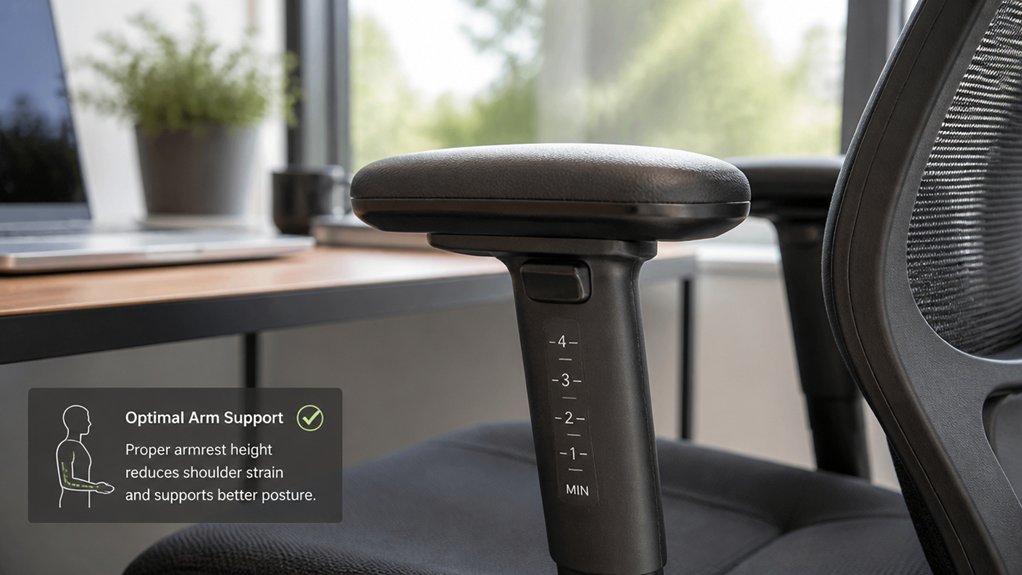
Proper armrest height is essential for maintaining shoulder health because it directly influences your posture and muscle engagement. When your armrest height is correct, it prevents chronic shoulder elevation or slumping, which can lead to shoulder pain.
Using an ergonomic chair with properly adjusted armrests helps your shoulders stay neutral, reducing unnecessary strain. Setting armrests 0–2 cm below your relaxed elbow level allows your shoulders to remain relaxed and minimizes muscle fatigue.
Multi-directional movements support customizable positioning that further reduces strain on shoulder muscles. Avoiding armrests that are too high or low prevents static loading and overwork of shoulder muscles, especially the upper trapezius and levator scapulae. Properly adjusted armrests support natural shoulder biomechanics with a 90–100° elbow angle, lowering the risk for musculoskeletal issues and promoting long-term shoulder health.
How Incorrect Armrest Heights Can Cause Shoulder Strain
If your armrests are too high, your shoulders stay raised all day, causing tension and fatigue. When they’re too low, your arms aren’t supported, leading you to slouch and strain your neck and shoulders. Improper height keeps your muscles under constant stress, increasing discomfort and risk of injury. Ensuring proper armrest adjustability can help maintain natural shoulder positioning and reduce strain.
Elevated Shoulders and Tension
When armrests are set too high, your shoulders are constantly lifted into a tense, elevated position. This causes persistent static posture issues, engaging muscles like the upper trapezius and levator scapulae, leading to fatigue. A properly adjusted armrest height can help maintain a balanced support system, reducing undue strain on shoulder muscles. The consequences include: 1. Increased muscle tension, which reduces blood flow and causes pain or stiffness in your neck and shoulders. 2. Chronic discomfort that worsens by the end of the day as muscles tighten. 3. Higher risk of musculoskeletal disorders due to sustained static shoulder positions, as high armrests force non-neutral shoulder postures.
Unsupported Arms and Slouching
Incorrect armrest height often leads to unsupported arms, which causes you to slump forward and hunch over your workspace.
When your armrest is too low, your arms lack proper support, forcing your shoulders into a forward position. This unsupported posture increases muscle tension in the trapezius and deltoid muscles, leading to shoulder strain over time.
Slouching due to inadequate armrest height promotes poor posture, making neck and upper back stiffness worse. As you lean forward or hunch to reach your desk, shoulder protraction and impingement risks rise.
Prolonged unsupported arms reduce blood circulation, contributing to ongoing muscle fatigue. Keeping armrest height optimized helps maintain proper posture, reduce muscle tension, and prevent the discomfort caused by unsupported arms and slouching. Additionally, adjustable arm supports can help personalize your setup for optimal ergonomic benefits.
Improper Support Causes Strain
Improper support from armrests directly contributes to shoulder strain by forcing your muscles to overcompensate for inadequate positioning. When your armrest height isn’t adjustable or properly set, your shoulder muscles work harder to maintain balance and posture. A mismatched armrest height can also lead to improper ergonomic alignment, increasing strain over time. 1. If the armrest is too high, your shoulders elevate constantly, leading to fatigue in the upper trapezius and levator scapulae muscles, which causes chronic shoulder strain. 2. Low armrests fail to support your forearms, prompting slumping or hanging arms that stretch and overwork shoulder muscles, resulting in dull pain. 3. Excessive width pushes elbows outward, promoting shoulder protraction, which increases the risk of impingement and long-term discomfort. Using ergonomic chairs with adjustable armrests helps prevent prolonged static loads, reducing muscle fatigue and shoulder strain.
Finding Your Ideal Shoulder-Neutral Posture
Achieving your ideal shoulder-neutral posture involves adjusting your armrests so that your shoulders remain relaxed and your elbows form a comfortable 90–100° angle. Set your armrest height 0–2 cm below your relaxed elbows to maintain neutral alignment and prevent shoulder elevation or slouching.
Sitting upright with your back against the chair and feet flat on the floor helps establish proper posture, making it easier to adjust your armrests correctly.
Proper armrest height supports your forearms lightly without forcing fixed positions, allowing your shoulders to relax naturally and reducing trapezius muscle fatigue. Check that your wrists hover comfortably over your keyboard and that your shoulders aren’t raised or protracted.
Ensuring the support technology of your armrests is appropriate can further enhance comfort and maintain ergonomic alignment during long periods of sitting.
This setup encourages a shoulder-neutral posture, minimizing strain and promoting long-term comfort while working.
Signs That Your Armrests Are Causing Shoulder Discomfort

Have you noticed persistent shoulder tightness or neck stiffness that worsens after sitting at your desk? If so, your armrest height might be causing shoulder discomfort.
Persistent shoulder tightness after desk work may signal improper armrest height affecting your posture.
Common signs include:
- Increased shoulder pain or strain in the evening, hinting at static muscle load from improper armrest height.
- Uneven shoulder discomfort or muscle fatigue, often caused by armrests set unevenly or forcing elbow splay, leading to uneven shoulder strain.
- Relief when resting arms freely, suggesting the armrests are forcing unnatural shoulder positioning and increasing muscle tension.
If you experience a sensation of shoulder shrugging or slouched posture, it’s a sign that your armrests are disrupting neutral shoulder alignment. Proper armrest height is crucial to maintain comfortable, healthy posture and reduce muscle tension.
How to Adjust Your Armrests for Comfort and Support
To adjust your armrests for ideal comfort and support, start by sitting upright with your feet flat on the floor and your shoulders relaxed. Position the armrest height about 0–2 cm below your relaxed elbow height to support your forearms without lifting your shoulders. Make sure your elbows bend at a 90–100° angle, keeping your shoulders relaxed to prevent muscle strain. Avoid lowering the armrests too much, as unsupported arms can increase tension in your shoulders and neck. Instead, aim for light, intermittent contact with the armrests rather than bearing full weight constantly. Fine-tune the height while maintaining an ergonomic setup and proper sitting posture, ensuring your forearms are well supported and your shoulders stay relaxed. Additionally, choosing an ergonomic chair with adjustable features, such as height adjustment, can help optimize your armrest positioning for better shoulder health.
Best Armrest Heights for Different Body Types
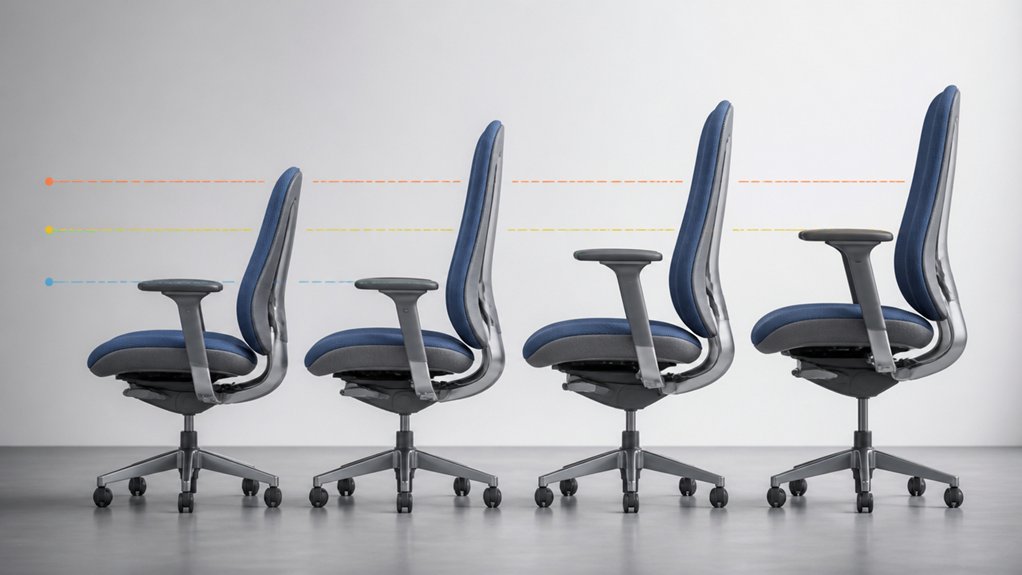
Your armrest height should match your arm length so that your elbows form a comfortable 90–100° angle with relaxed shoulders.
Taller people need higher armrests, while shorter users should opt for lower ones to prevent slumping. Also, consider your shoulder width to guarantee your armrests support your forearms without forcing your shoulders into an awkward position.
Adjust for Arm Lengths
Adjusting armrest height according to your arm length is essential for maintaining proper posture and comfort. An ergonomic setup supports your shoulder, reduces musculoskeletal discomfort, and keeps your neck relaxed.
To optimize armrest height based on arm length:
- Set the armrest about 1–2 cm below your relaxed elbow, ensuring your forearm rests comfortably without lifting your shoulder.
- If your arms are longer, lower the armrest slightly to prevent shoulder elevation and maintain a neutral shoulder posture at a 90–100° elbow angle.
- For shorter arms, raise the armrest within the ergonomic range to avoid arms dangling and causing strain.
Proper height adjustment keeps elbows close to your torso, promotes natural arm movement, and prevents static muscle load — key for long-term shoulder health.
Consider Shoulder Widths
Have you considered how your shoulder width impacts the ideal armrest position? Your shoulder width determines the best armrest height and width to maintain a neutral shoulder posture.
If you have broader shoulders, you’ll want to adjust armrests slightly wider and higher—around 1–2 cm below relaxed elbow level—to prevent shoulder elevation or inward compression. Narrow-shouldered users should position armrests closer and lower to avoid arm splaying.
Incorrect armrest width can force shoulders into protraction or elevation, causing muscle fatigue and impingement. Customizable armrests with adjustable height and width help you achieve proper alignment, supporting relaxed shoulders and reducing static muscle load.
Considering your shoulder abduction and adjusting accordingly guarantees comfortable, healthy posture during prolonged sitting.
Supporting Your Elbows Without Raising Your Shoulders
To support your elbows effectively without raising your shoulders, the goal is to position armrests slightly below your relaxed elbow level—about 0 to 2 centimeters. This guarantees proper forearm support without shoulder elevation.
When adjusting the armrest height and armrest position:
- Confirm your elbows are at a 90–100° angle, allowing natural arm placement.
- Keep shoulders relaxed, avoiding shrugging or tensing muscles.
- Maintain the armrests just below elbow height to prevent shoulder elevation, which can lead to neck and shoulder strain over time.
This setup promotes comfortable support, reduces static load, and helps keep your shoulders in a neutral, relaxed position, ultimately improving posture and minimizing muscle fatigue.
How Armrest Placement Affects Blood Flow and Muscle Fatigue
Proper armrest placement doesn’t just support your elbows comfortably; it also plays a key role in maintaining healthy blood flow to your shoulders and neck. An incorrect armrest height causes your shoulders to rise, increasing static load on shoulder muscles and restricting blood circulation.
When your armrests are too high or too low, your forearms won’t stay parallel, forcing muscles into sustained contraction. This persistent static load hampers oxygen delivery, leading to muscle fatigue and stiffness. Poor support also compresses blood vessels around the shoulder and neck, reducing circulation and raising the risk of musculoskeletal discomfort.
Adjusting your armrest to promote light, intermittent support keeps blood flowing smoothly and minimizes muscle fatigue. Dynamic, well-positioned armrests help sustain shoulder health, especially during extended sitting periods.
Coordinating Armrest and Desk Setup for Comfort
Achieving ideal comfort and ergonomic health relies on how well you coordinate your armrest and desk heights. To do this:
- Set your armrest height 0–2 cm below relaxed elbow height to maintain a neutral shoulder and prevent muscle fatigue.
- Adjust your desk height so your elbows are at a 90–100° angle, matching the armrest position without lifting or slumping shoulders.
- Use adjustable armrests and a height-compatible desk to fine-tune your workspace for your proportions and tasks.
Proper coordination guarantees your forearms rest lightly, relieving trapezius load without shoulder strain.
An ergonomic setup with carefully aligned armrest and desk heights promotes neutral shoulder posture, comforts your muscles, and supports long-term shoulder health.
Common Mistakes in Armrest Positioning and How to Avoid Them
Many people make mistakes when adjusting armrests, which can lead to discomfort and long-term pain. Setting armrests too high or too low creates unnecessary strain, while incorrect width can force your elbows into awkward positions.
To prevent these issues, guarantee your armrests are properly aligned with your desk and seated height.
Armrest Too High
Have you ever noticed your shoulders lifting or feeling tense when your armrests are set too high? If so, your armrest height might be contributing to shoulder elevation, forcing your shoulders into a shrugging posture.
This static load strains your upper trapezius and levator scapulae muscles, increasing fatigue and the risk of musculoskeletal disorders. To avoid this, make sure your armrests are set no more than 0-2 cm below relaxed elbow level.
- When armrests are set too high, they prevent your shoulders from remaining relaxed, causing unnecessary shoulder elevation.
- This position reduces blood circulation, leading to neck pain and discomfort over time.
- Additionally, high armrests often push you forward, causing strain on your shoulders, neck, and upper back, raising the risk of musculoskeletal disorders.
Armrest Too Low
Setting your armrests too low is a common mistake that can lead to unnecessary strain on your shoulders and neck. When the armrest height isn’t aligned with your elbows, your shoulders may slump or lean forward, forcing muscles to work harder. This poor posture increases muscle fatigue and dull discomfort or pain in your neck and shoulders.
Low armrests fail to support your forearms, prompting you to let your arms hang, which stretches shoulder muscles and promotes tension. Over time, this static load reduces circulation and causes stiffness.
To prevent this, adjust your armrests to sit about 0–2 cm below your relaxed elbow height. Properly positioned armrests help maintain neutral shoulder posture and reduce muscle fatigue, supporting overall shoulder health.
Incorrect Width Adjustment
Incorrect width adjustment of your armrests can lead to unnecessary strain on your shoulders and impair movement. An incorrect armrest setup causes the elbows to splay outward or sit too close to the torso, affecting shoulder posture.
To avoid this:
- Adjust armrest width so your elbows stay 5–10 cm from your torso, keeping shoulders relaxed.
- Set armrests to prevent excessive abduction beyond 20°, which increases muscle fatigue.
- Use adjustable armrests with width and pivot features to customize support, preventing postural imbalances and maintaining natural arm alignment.
Incorporating Movement to Reduce Shoulder Tension During Work
Incorporating movement into your work routine is essential for reducing shoulder tension, especially when using armrests frequently. Start by adjusting the armrests throughout the day to prevent static muscle load and promote circulation. When your shoulders are relaxed, your muscles won’t tire as quickly.
Alternate between supporting your forearms with the armrests and letting your arms hang freely to encourage muscle relaxation. Schedule regular breaks every 20-30 minutes to perform shoulder rolls or arm stretches, helping to relieve tension.
Dynamic armrest use—like slight height adjustments or pivoting—adds variety to your posture, reducing discomfort. Lower the armrests periodically to allow full shoulder mobility, preventing stiffness and pain from prolonged static positions. Movement and adjustment keep tension at bay and promote comfort all day long.
When and Why to Upgrade to Fully Adjustable Armrests
Upgrading to fully adjustable armrests becomes necessary when your current armrest setup causes persistent shoulder elevation or slumping, leading to chronic discomfort. Poor positioning results in muscle strain and upper trapezius muscle fatigue, increasing injury risk.
Upgrade to adjustable armrests to prevent shoulder strain and reduce muscle fatigue from poor positioning.
Consider switching if:
- Your fixed armrests prevent you from maintaining a neutral shoulder posture, causing tension.
- You frequently experience shoulder or neck pain during long tasks, indicating poor forearm support.
- Static arm positions lead to ongoing muscle strain, fatigue, or discomfort that doesn’t improve with adjustments.
Fully adjustable armrests allow precise control of height, width, depth, and pivot, helping you support your forearms properly. This promotes healthier shoulder alignment, reduces muscle fatigue, and prevents long-term musculoskeletal issues.
Fine-Tuning Your Armrest Setup for Different Tasks
To get the most comfort and efficiency, adjust your armrests based on the task you’re doing, whether typing or gaming. Switch their width and pivot angles as your posture or activity changes, supporting dynamic movements and reducing muscle strain.
Remember to use light support during breaks to avoid static muscle load and keep your shoulders relaxed.
Adjust for Task Types
Adjusting your armrests for different tasks guarantees peak comfort and support. To optimize shoulder and arm health, you need to “adjust your armrests” based on activity.
For typing, keep your armrests narrow and set at 1–2 cm below relaxed elbow height to support 60–80% of forearm weight, keeping your shoulders relaxed.
When gaming or doing dynamic mouse work, widen the armrests and utilize 4D pivot adjustments to allow freedom of movement while supporting the forearms. Remember to fine-tune the armrest height so your elbows bend between 90–100°, ensuring shoulders stay relaxed and static muscle loading is avoided.
Regularly reassess your armrest position to favor intermittent forearm support and prevent unnatural postures during different tasks.
Transition Between Postures
Shifting between different postures throughout the day is key to maintaining comfort and reducing muscle strain. To do this effectively, you need to adjust your armrests as your tasks change.
For typing, position the armrests so they sit 0-2 cm below your relaxed elbow, helping you keep a neutral shoulder posture. When using the mouse or reaching, widen and pivot the armrests to support your forearm without forcing shoulder abduction.
During active movements, lower the armrests slightly, and raise them for brief rest periods. Avoid keeping armrests fixed in one position—regularly adjust them to promote better blood flow and reduce static muscle load. These quick posture shifts can make a significant difference in long-term comfort and shoulder health.
Use Support During Breaks
Using armrests for support during breaks can greatly promote shoulder relaxation and reduce static muscle load. During pauses, rely on armrests to give your shoulders a break from sustained tension. Adjust the armrest height slightly below your relaxed elbow (0-2 cm) to prevent shoulder elevation and promote natural arm positioning.
During different tasks, support needs change:
- Temporarily raise or lower the armrest height to match task intensity, providing intermittent support instead of constant weight.
- Fine-tune the armrest width and angle to allow comfortable arm repositioning without forcing unnatural shoulder or elbow angles.
- Alternate support by freeing your arms during active work while using the armrests during breaks, maintaining dynamic posture and avoiding muscle fatigue.
The Role of Armrests in Preventing Long-Term Shoulder Problems
Properly positioned armrests play a crucial role in preventing long-term shoulder problems by supporting your forearms and helping maintain relaxed, neutral shoulder positions. If you have a chair with adjustable armrests, you can set the ideal armrest height to reduce the load on your shoulders and upper arms.
The right armrest prevents your shoulders from elevating, which minimizes muscle fatigue and strain, especially in the upper trapezius and levator scapulae muscles. When you set your seat height correctly, your elbows should bend at around 90°, allowing for proper armrest contact.
Light, intermittent contact with armrests avoids rigid postures that cause overuse injuries. Combining this with periodic movement and correct desk height promotes healthier shoulders and reduces long-term musculoskeletal issues.
Key Takeaways for Maintaining Shoulder Comfort at Your Desk
Maintaining shoulder comfort at your desk hinges on setting your armrests correctly and making small adjustments as needed. To achieve this, remember:
Adjust your armrests for relaxed shoulders and long-term comfort through small, frequent tweaks.
- Make sure armrests are set 0–2 cm below relaxed elbow height to keep shoulders relaxed and prevent chronic elevation or trapezius fatigue.
- Keep elbows bent at a 90–100° angle for a neutral shoulder posture, reducing musculoskeletal strain.
- Practice regular fine-tuning of armrest height during work to support dynamic posture, improve blood flow, and prevent muscle fatigue.
Avoid armrests that are too high, which cause sustained shoulder lifting, or too low, leading to unsupported arms and neck tension.
Proper adjustments encourage upright sitting and relaxed shoulders, fostering long-term comfort.
Frequently Asked Questions
Can Armrests Cause Shoulder Pain?
Yes, improper armrest height can cause shoulder pain. If they’re too high or low, they force your muscles into awkward positions, leading to fatigue, discomfort, and stiffness—especially after a long day at your workspace.
What Is Normal Shoulder Elevation?
Normal shoulder elevation means your shoulders stay relaxed and level with your spine, neither lifting nor dropping. You maintain a natural, neutral position, which helps prevent muscle fatigue, supports good posture, and reduces shoulder or neck discomfort during sitting.
What Is the Standard Height of an Armrest?
The standard armrest height is usually set about 1 to 2 centimeters below your relaxed elbow when you’re seated comfortably. This position helps keep your shoulders relaxed, prevents strain, and supports your forearms without lifting your shoulders.
What Is the Best Position for Armrests?
You should position armrests about 0 to 2 cm below your relaxed elbow height, ensuring your elbows bend at 90 to 100 degrees, supporting your forearms lightly, and keeping your shoulders relaxed and neutral during sitting.



