
Your vision greatly impacts your computer posture because if you struggle to see clearly, you may lean forward, tilt your head, or squint, which causes muscle tension and discomfort. Eye discomfort and strain can lead to awkward positions that put additional stress on your neck, shoulders, and head. Correcting vision issues or adjusting your setup can help you sit naturally and comfortably. Keep going to discover ways to improve both your eyesight and posture for better health.
How Poor Vision Causes Posture Problems at Your Computer
Poor vision can directly cause posture problems at your computer because it compels you to adopt awkward positions to see clearly.
Poor vision forces awkward postures, leading to strain and discomfort during computer use.
When your eyes struggle with focusing or experience vision problems like nearsightedness, you often lean forward or tilt your head to get a better view of the computer screen. This forward head posture helps reduce blurry vision but strains your neck and shoulders.
Eye misalignment or poor coordination worsen these issues, prompting you to tilt or round your shoulders to minimize eye strain or double vision.
Over time, these compensations tighten neck and shoulder muscles, increasing discomfort and worsening poor posture. Ultimately, your visual challenges lead to an adaptive body position that contributes to digital eye strain and musculoskeletal stress.
Additionally, using blue light filters can help improve visual clarity and reduce the need for awkward postures caused by eye strain.
The Link Between Eye Strain and Neck and Shoulder Pain
Eye strain from prolonged screen use often leads you to adopt awkward head positions, like leaning forward or tilting your head, to see more clearly. These compensatory head positions place strain on your neck and shoulders, causing muscle tightness over time.
Poor posture, driven by visual system discomfort, increases muscle tension and results in pressure and heaviness around your eyes and head.
Excessive screen time with improper viewing distances or angles exacerbates these issues, prompting you to lean or slouch toward the screen.
Reducing eye strain with correct lenses, ergonomic screen placement, and mindful posture can ease these symptoms. When your visual system is less strained, you won’t need to adopt awkward positions, ultimately alleviating neck and shoulder discomfort linked to eye strain.
Implementing anti-glare and blue-light filtering screen protectors can significantly improve visual comfort and help maintain proper posture during extended computer use.
How to Recognize Signs of Vision-Posture Issues While Working
Pay attention to your body while working—if you notice yourself tilting your head or bumping into objects, it may signal vision-related issues.
Frequent headaches, eye fatigue, or sudden posture changes can also point to underlying visual problems affecting your stance. Recognizing these signs early helps you address posture issues linked to uncorrected vision.
Head Tilting or Bumping
If you find yourself tilting your head or leaning closer to the screen more often than usual, it could be a sign that your eyes are struggling to focus properly.
You might notice yourself:
- Tilting your head to better align with the screen, trying to reduce strain on your eye focusing.
- Bumping into objects or misjudging depth, which suggests binocular vision dysfunction affecting spatial perception.
- Bending your head forward to see clearly, especially if you have uncorrected refractive errors like myopia.
- Consistently shifting your head to find the right position, creating an awkward posture.
- Using monitor privacy screens to reduce glare and blue light exposure, which can help alleviate eye strain and improve focus during prolonged screen time.
These signs indicate your vision issues influence your posture, and recognizing them can prompt you to seek an eye exam and improve your ergonomic setup.
Frequent Headaches or Fatigue
Do persistent headaches while working at the computer signal more than just tired eyes? Frequent headaches are often a sign of underlying eye strain caused by poor posture.
When your eyes struggle to focus, your body compensates with adjustments like leaning forward or slouching, which can lead to neck tension and discomfort. Symptoms such as blurred vision or squinting, especially alongside persistent headaches, may indicate binocular vision dysfunction affecting your posture.
You might notice yourself blinking more, rubbing your eyes, or shifting your sitting position frequently to ease visual discomfort. Recognizing these signs early helps identify vision-posture issues, so addressing eye strain and improving your workspace setup can reduce headaches and help maintain better alignment while working. Blue light filtering lenses and ergonomic adjustments are key in supporting long-term eye health and posture.
Posture Changes During Tasks
Noticing changes in your posture during work can reveal underlying vision-related issues. When you lean forward or tilt your head, it’s often a sign that your eyes struggle to focus, prompting you to adjust your posture. A comprehensive monitor calibration can help reduce eye strain, potentially alleviating some of these misalignments.
Watch for these signs:
- Leaning forward or frequently shifting closer to the screen to see clearly.
- Squinting or narrowing your eyes to reduce glare or blur.
- Favoring one shoulder or experiencing neck and shoulder tension due to binocular vision dysfunction.
- Constantly adjusting your body position or bumping into objects, indicating difficulty aligning your eyes with on-screen content.
These signs suggest your vision affects your posture and may contribute to eye strain or neck discomfort.
Recognizing them helps you address underlying vision issues and improve your overall ergonomic habits.
How Correcting Your Vision Can Improve Your Posture
Proper vision correction encourages better posture by reducing the need to tilt or lean forward. This means you’ll experience less neck tension and keep your head in a healthier, more balanced position. Additionally, using a high-quality, tunable light, can further reduce eye strain and improve visual comfort during long hours at the computer.
Clearer Vision Less Strain
Correcting your vision can greatly reduce the strain on your eyes, neck, and shoulders when working at a computer. When you have clearer vision, you’re less likely to lean forward or tilt your head, promoting better posture.
A thorough eye exam guarantees your glasses are prescribed correctly for screen distance—typically 20–28 inches. Proper vision therapy can also enhance your eye focus, reducing blurred vision.
Here are four ways clearer vision decreases strain:
- It improves visual clarity at the computer screen.
- Encourages maintaining the ideal screen position below eye level.
- Lessens the need for repetitive eye adjustments that cause fatigue.
- Supports natural eye coordination, reducing compensatory postural shifts.
- Features like manual-focus lenses allow fine-tuning for varying seating distances, further reducing eye and neck strain.
All these factors together help you stay comfortable and upright, preventing strain and long-term discomfort.
Corrected Vision Promotes Posture
Properly correcting your vision directly supports better posture by reducing the need to lean forward or tilt your head toward screens. When you have corrected vision, your eyes focus comfortably at typical computer distances, minimizing eye strain and the muscle tension that causes head tilt. Additionally, flicker-free lighting plays a crucial role in decreasing visual discomfort, helping you maintain a more natural and relaxed head position during prolonged computer use.
Eye exams guarantee your prescription is up to date, helping you maintain an ergonomic posture during computer use. With clear vision, your head aligns naturally, preventing neck and shoulder muscle tightness caused by poor posture linked to uncorrected vision.
Addressing binocular vision dysfunction with proper correction further reduces compensatory head tilts and slouching. Consistent eye exams and correct prescriptions promote healthier body alignment, making it easier to stay upright and relaxed during work sessions.
Reduced Head Tilt
Adjusting your vision to be clear and accurate directly impacts head positioning by reducing the need to tilt forward or sideways to see your screen. Proper vision correction helps maintain a neutral head position, preventing strain and discomfort.
When your eyes are sharp, you’re less likely to adopt compensatory movements that cause poor head alignment.
- Correcting vision eliminates unnecessary head tilt caused by blurred images or eye strain.
- Specialized computer lenses improve focus at screen distance, fostering better head posture.
- Reducing blur and binocular vision issues helps sustain proper head alignment.
- Clear vision decreases subconscious postural adaptations, promoting a more natural, upright posture.
- Using appropriate monitor accessories, such as monitor hoods, can further enhance visual clarity and reduce glare-related strain.
Ergonomic Tips to Support Healthy Eyes and Better Posture
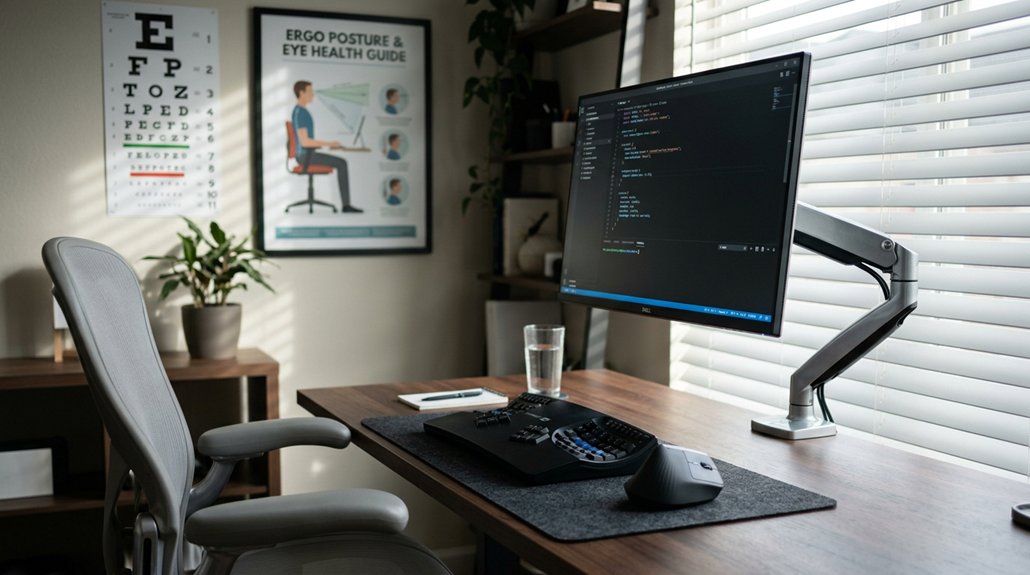
Maintaining good ergonomic habits while working at a computer can greatly reduce eye strain and improve posture. Position your monitor just below eye level, about 20 to 28 inches from your face, to promote a relaxed viewing angle and reduce eye fatigue. Use an anti-glare screen and control your lighting to minimize reflections and squinting. Guarantee that your workspace has even lighting and isn’t overly dark. Sit fully back with your feet flat on the floor to support better posture and prevent neck or shoulder tension. Remember to take breaks every 20 minutes and look at something 20 feet away for 20 seconds, supporting visual comfort and reducing strain. Choosing a monitor stand with adjustable height and tilt features can help you maintain proper ergonomics, ensuring your screen is at the optimal position for comfort and health.
Practical Strategies to Maintain Eye and Posture Health at Home
Ever wonder how to keep your eyes and posture healthy while working at home? Here are practical strategies to improve your posture and vision.
- Position your monitor 20 to 28 inches from your eyes and slightly below eye level to reduce neck strain.
- Use adjustable lighting and anti-glare screen protectors to minimize glare and prevent squinting, which can worsen forward head posture.
- Maintain an upright sitting posture with feet flat on the floor and back supported to lessen eye and neck muscle tension.
- Follow the 20-20-20 rule—every 20 minutes, look at something 20 feet away for 20 seconds—to reduce eye strain and support better posture.
These steps help promote eye care and reduce discomfort while working on the computer at home.
Frequently Asked Questions
How Does Vision Affect Posture?
Your vision influences your posture because when your eyes struggle to see clearly, you instinctively adjust by leaning forward, tilting your head, or slouching. These compensations help you focus but can lead to discomfort and misalignment.
How Do I Fix Computer Vision Syndrome?
To fix Computer Vision Syndrome, get a thorough eye exam, use computer-specific glasses, adjust your screen and lighting, take regular breaks, and optimize your workspace ergonomics to reduce eye strain and improve overall comfort during screen use.
Can Aspartame Affect Eyesight?
You might hear aspartame affects eyesight, but current research shows no conclusive link. Some sensitive individuals report visual disturbances, but if you notice changes, it’s best to consult a healthcare professional for proper evaluation and advice.
What Is the 20 20 Rule for Computer Vision Syndrome?
The 20-20-20 rule means every 20 minutes, you should look at something 20 feet away for at least 20 seconds. It relaxes your eye muscles, reduces strain, and helps prevent symptoms like headaches and blurry vision during computer use.



